Device Configuration over Wi-Fi AP
To allow quick and user-friendly configuration of Raspberry Pi network you can implement Wi-Fi Access Point API and access the Device Configuration menu from your mobile phone or PC. The device starts its own Wi-Fi network. You can connect to it using your browser. The website served from the device lets you set network configuration.
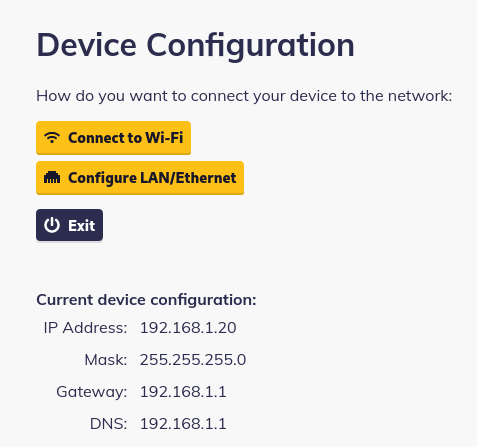
You can set a Wi-Fi connection or LAN. On the home screen, there is also an Exit button to switch this device's Wi-Fi off and disconnect you.
How to enable/start the Wi-Fi AP
The AP can be started via JS SDK enableAP().
How to open up the Wi-Fi AP configuration
Once is the Wi-Fi started via the JS SDK, you can connect to the configuration page on the http://IP-ADDRESS-OF-DEVICE:8090 - eg. 192.168.1.145:8090.
To be able to open up the configuration page, you have to be connected to the Wi-Fi AP generated by the RPi.
LAN / Ethernet Configuration
Most likely you will use this configuration when your network does not use DHCP.
- Switch DHCP off and enter network configuration manually.
- All fields expect plain IPv4 addresses.
- In the DNS field, you can enter multiple IP addresses separated by a comma.
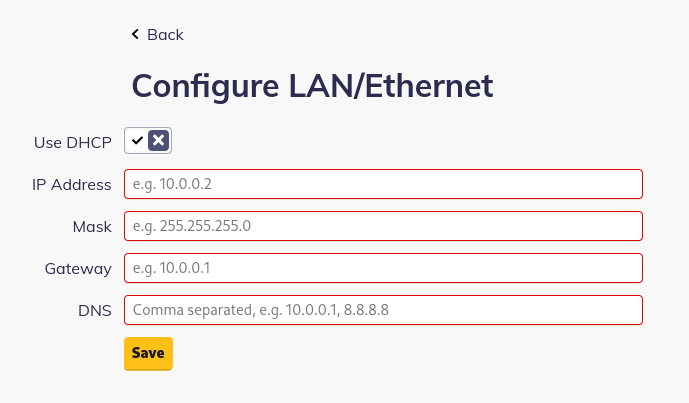
Configuration is applied when you click Save.
The device may disconnect the built-in Wi-Fi when the configuration is saved.
Wi-Fi Configuration
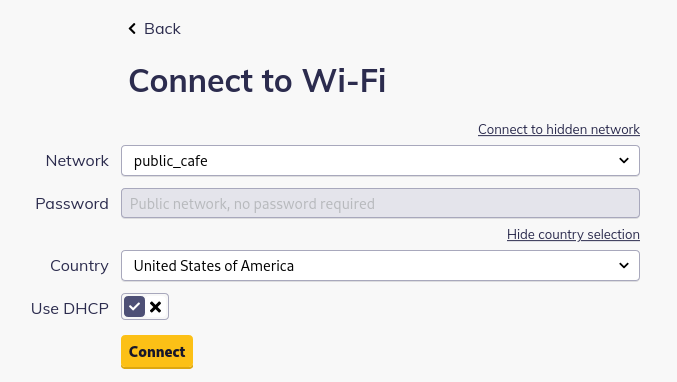
To configure Wi-Fi just select your network from the list, type in the password, and hit Save.
When the configuration is saved you will be disconnected from the device's Wi-Fi.
When your network is not on the list, you may enter its name (SSID) manually. The manual switch is above the SSID list.
Wi-Fi specifications may differ by country and automatic detection may not always be accurate. Click Change Country below the password field to select your country manually.
- When your network does not use DHCP, switch it off and enter values manually.
- All fields expect plain IPv4 addresses.
- In the DNS field, you can enter multiple IP addresses separated by a comma.
Lost network connection
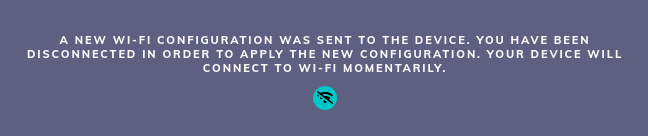
When this message appears:
It means your browser lost connection to the device. In most cases your computer or phone is connected to a different network. Make sure you are connected to the Wi-Fi provided by your device.
This message may also show up when your device received the correct network settings and switched its Wi-Fi off.