Trigger failover
Sync group playback enables multiple devices to play content simultaneously, maintaining precise synchronization across all devices. A failover mechanism ensures that if one device in the group turns off or disconnects, another device assumes responsibility for playback without interrupting the experience.
This failover mechanism is a synchronization feature, but it is implemented with trigger syntax — see Triggers and Interactivity for the general trigger model. SMIL player leverages that trigger functionality to dynamically switch between playlists in the event of a failover.
Define list of failover triggers
For the purpose of this documentation, let's assume we have a sync group with 3 devices, marked as: Display1, Display2, Display3. Code snippets are taken from Display1 SMIL file.
Trigger setup
<triggers>
    <trigger id="triggerDisplay3" condition="or">
        <condition origin="sync" data="Display3"/>
    </trigger>
    <trigger id="triggerDisplay2Display3" condition="or">
        <condition origin="sync" data="Display2Display3"/>
    </trigger>
</triggers>
- id = unique identifier for the trigger, used to reference the trigger in the playlist
- condition = logical operator to combine multiple conditions
- origin = marks trigger as a sync trigger to use sync group functionality
- data = identifier(s) of the missing device(s). For multiple devices, concatenate their ids sorted
alphabetically, with no separator — the player builds the lookup key as
sort + join, sodata="Display2Display3"fires butdata="Display3Display2"never matches.
Explanation
If Display3 has issues playing content, triggerDisplay3 takes over and plays.
If both Display2 and Display3 have issues playing content, take over and play triggerDisplay2Display3. To cover every
failure combination in a 3-device group, define a trigger for each subset of the other devices (e.g. on Display1:
Display2, Display3, Display2Display3).
Required applet configuration
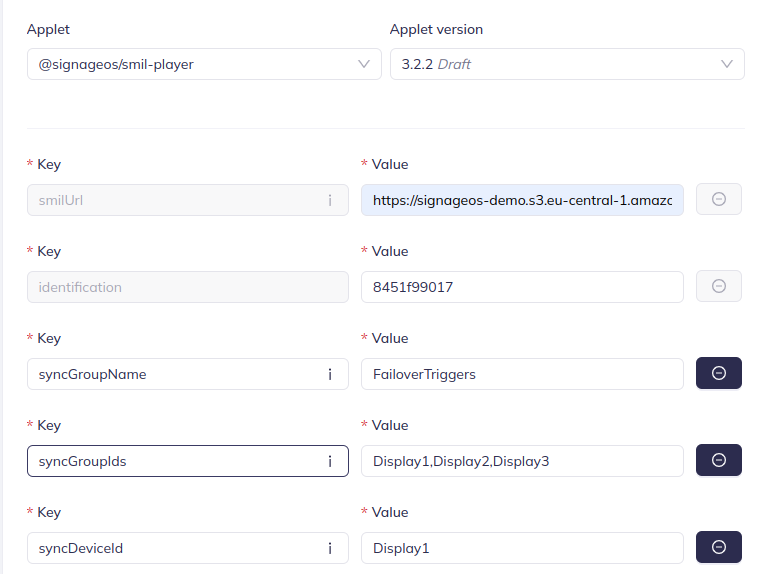
Failover triggers only work when the device knows the full group membership and its own identity:
syncGroupIds— comma-separated list of all device ids in the group (e.g.Display1,Display2,Display3)syncDeviceId— this device's id; must be one ofsyncGroupIds
The player continuously compares the connected peers against syncGroupIds; when a device disappears, the matching
sync trigger fires on the remaining devices, and when it reconnects, the trigger content stops automatically.
As with any sync group, syncGroupName must also be configured and
unique per group.
For sub-region setup, see Sub-regions in the trigger overview — failover content is triggered content, so it plays in a sub-region like any other trigger.
Define content triggered by the failover trigger
- The behavior for this trigger is that it will play the content section indefinitely, or until Display3 recovers and is able to play its own playback again.
<par>
    <seq begin="triggerDisplay3" dur="indefinite">
        <img src="https://demo.signageos.io/smil/zones/files/img_1.jpg"
             dur="5s" region="video">
        </img>
        <img src="https://demo.signageos.io/smil/zones/files/img_3.jpg"
             dur="5s" region="video">
        </img>
    </seq>
</par>
Applet setup